Ride the line you planned. Anywhere.
Plan in Komoot, Strava, Ride with GPS or Mapy, or right in PedalQ. Your phone on the handlebar follows the line, with spoken turn cues, climbs ahead and rear radar, even with no signal.


Plan where you like. Ride it here.
Bring a route from the planner you already use, or plan one in PedalQ. Either way, it’s ready on the phone before you leave.
No route yet? Search a destination in PedalQ and pick one of three: on cycle paths, shorter, or flatter.
No planner?Ride it once and save it as a route. See how →Follows your line. Gets you back to it.
Miss a turn and PedalQ shows how far off you are, then a new way back onto your line, worked out on the phone with no signal. It never swaps your route for one of its own.
Read in one second at 25 km/h.
2 to 10 big fields per page, a touch lock for rain and gloves, and a night theme that doesn’t dazzle. The status row shows GPS signal and every battery at a glance.
Know what’s left to the top.
Every climb on your route, coloured by gradient and labelled with numbers. On the climb: distance and ascent left, and the gradient right now.
See what’s coming from behind.
A strip at the screen edge shows each vehicle as it closes in, over every page, with spoken alerts. If the radar drops out, it says so plainly.
Plan and re-route with no signal.
Search a destination and choose a route: on cycle paths, shorter, or flatter. Off your line in the hills with no reception? PedalQ works out the way back on the phone.
Ride it once. Keep it as a route.
Found a loop worth repeating? Save any ride as a route and ride it again with turn cues, climbs and the offline map. No planner needed.
Laps the way you train.
Press Lap on the screen or in the notification, or let PedalQ lap every 5, 10 or 20 km or each time you pass the same spot. Every lap goes into the summary and your exports.
The next turn, even with the screen off.
On the lock screen, PedalQ shows the next turn with its arrow and distance, plus moving time, distance and distance to go, with Pause and Lap right there.
And everything around the ride
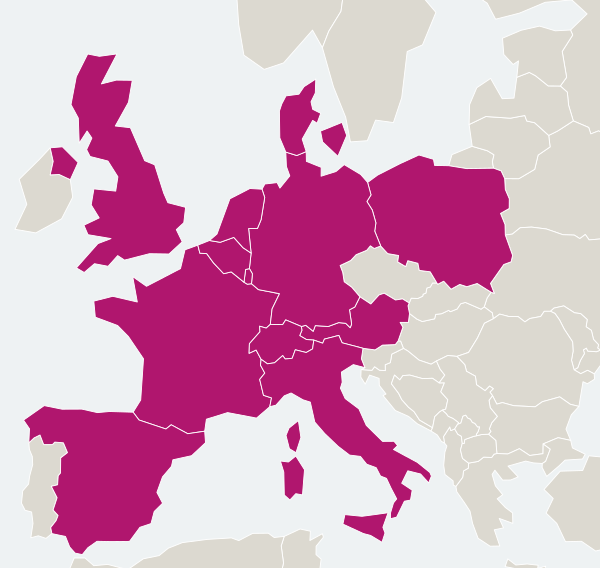
Maps that work with no signal
Download a country or a German state once, over Wi-Fi, and ride with no signal. Offline maps are available for:
Honest price. Paid once.
Free is a complete bike computer, not a trial. The unlock is €9.99, once. No timers, no pop-ups during a ride.
Your rides stay on your phone.
No account, nothing to log into, no ads. Export to FIT or GPX whenever you like, or send rides to Apple Health, Health Connect and intervals.icu, only if you switch it on.
Read the full privacy policy →Questions
Does it work without signal?+
Yes. Recording, the ride screen, sensors, turn cues, voice, climbs and re-routing all work offline. Download the offline map for your region first; the routing data comes with it. Weather is cached from the last time you had signal.
Which radars work?+
Garmin Varia, all current models. Bryton Gardia works too, marked as experimental for now. Some radars must be paired once in the phone’s Bluetooth settings before PedalQ can see them; the app walks you through it.
Is there an iPhone version?+
Yes. PedalQ is coming to the App Store and Google Play; the iPhone beta opens soon on TestFlight.
How much battery does it use?+
The screen uses the most. The night theme on an OLED phone, a lower brightness and turning the screen off between turns all help; cues still play with the screen off. For long days, bring a small power bank.
Is there a subscription?+
No. PedalQ is free to use, and the unlock is a one-time €9.99. What’s free stays free.
Do I need an account?+
No. There’s no account, and your rides stay on your phone unless you export or connect a service yourself.
Your phone is already a bike computer.
Free to download and free to ride. Unlock sensors, offline maps, climbs and radar for €9.99, once.
 English
 Deutsch
 Nederlands
 Français
 Italiano
 Español
 Polski
 Dansk
Dansk